
Pixelcut AI Photo Editor
Remove Background, Magic Eraser, Photo Enhancer, Story Templates, Collage Maker

App Screenshots





Pixelcut AI Photo Editor - A Comprehensive Review
Pixelcut AI Photo Editor Review
Overview
Pixelcut AI Photo Editor has rapidly become one of the most downloaded apps in the Art & Design category, boasting over 11.8 million installs and a robust 4.34-star rating from 168,940 users. The app’s core proposition is simple: leverage artificial intelligence to transform ordinary photos into visually stunning creations with minimal effort. It positions itself as an “all-in-one editor” catering to both casual users and those seeking quick solutions for social media content or basic graphic design needs. The free nature of the app, combined with its extensive feature set – including background removal, magic eraser tools, AI photo generation, and pre-designed templates – contributes significantly to its popularity. This review will delve into the specifics of Pixelcut’s functionality, usability, and overall value proposition, providing a comprehensive assessment for potential users.
Key Features
Pixelcut offers a compelling suite of features centered around AI assistance and creative tools:
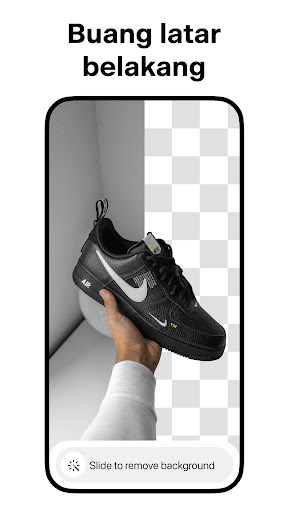
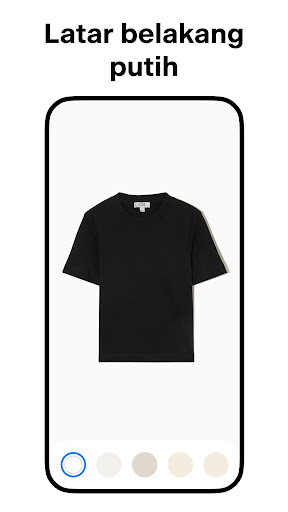
- Background Remover: This is arguably the app's flagship feature. Utilizing AI, it automatically detects and removes backgrounds from photos with remarkable accuracy. The results are generally clean and precise, particularly with subjects that have clear edges.
- Magic Eraser: Similar to Google’s Photo Unblur tool, this feature allows users to identify and erase unwanted objects or blemishes directly from their images. The AI attempts to intelligently fill in the removed areas based on surrounding textures and patterns – sometimes successfully, other times requiring manual refinement.
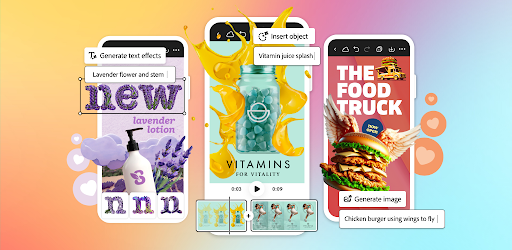
- AI Photoshoot: This innovative feature employs AI to generate a series of product photos using pre-set templates and adjustable parameters like lighting, background, and props. It's geared towards e-commerce businesses looking for quick and cost-effective ways to showcase their products. The generated images are surprisingly realistic, though detailed adjustments can be time-consuming.
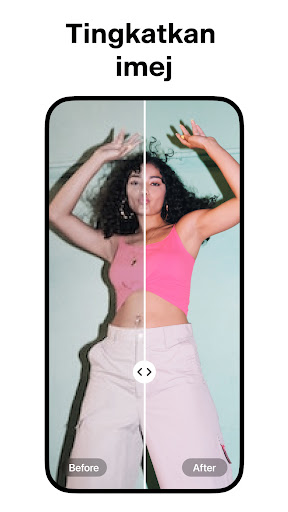
- Photo Enhancer: A basic yet useful tool that automatically adjusts brightness, contrast, saturation, and sharpness – offering a simple “one-tap” improvement for less demanding editing needs.
- Story Templates: A library of pre-designed templates optimized for Instagram Stories and other social media platforms. These offer a quick way to create branded content without needing extensive design skills.
- Collage Maker: Allows users to combine multiple photos into various collage layouts, offering customization options for borders, backgrounds, and spacing.
Strengths
- Ease of Use: Pixelcut’s intuitive interface is a significant strength. The app's reliance on AI significantly reduces the learning curve, making it accessible to users with little or no prior photo editing experience. The drag-and-drop functionality and one-tap enhancements are particularly user-friendly.
- Powerful AI Capabilities: The background removal and AI photoshoot features truly stand out. They deliver impressive results quickly, saving significant time compared to manual editing methods. The Magic Eraser shows considerable potential for removing distractions from photos.
- Wide Range of Templates: The Story Template library provides a valuable resource for users seeking inspiration and ready-made designs for social media content.
- Large User Base & Active Development: With over 11.8 million installs, Pixelcut benefits from a large user base, contributing to ongoing app development and improvements. Frequent updates suggest the developers are responsive to user feedback.
Areas for Improvement
- Magic Eraser Refinement: While functional, the Magic Eraser requires significant manual tweaking in many cases. The AI’s ability to accurately fill in removed areas needs improvement – particularly with complex textures or detailed backgrounds.
- AI Photoshoot Limitations: The AI Photoshoot feature, while impressive, can be restrictive. Users have limited control over specific parameters beyond preset options, which may not always align with their creative vision. Increased customization would greatly enhance this feature’s appeal.
- Pricing Model (Future Considerations): While currently free, the app's success relies on attracting a massive user base. Future monetization strategies must be carefully considered to avoid impacting the user experience and potentially alienating existing users.
- Batch Processing: The ability to process multiple images at once would drastically improve workflow efficiency for users who regularly edit large quantities of photos.
User Experience
The user interface is clean, modern, and highly intuitive. Navigation is straightforward – with clearly labeled icons and a logical flow between features. The app’s responsiveness is generally good; however, the AI processing can occasionally be slow, particularly when generating images using the AI Photoshoot feature. The visual feedback during background removal is immediate and satisfying, which contributes to a positive user experience. The onboarding process is seamless, guiding new users through the core functionalities without feeling overwhelming.
Value for Money
As a free app with a substantial feature set, Pixelcut offers excellent value for money. Users can access powerful AI tools and creative templates without any upfront cost. The potential savings in time compared to manual editing processes alone justify the app's use. While premium features or subscription options might be introduced in the future, the current free version provides ample functionality for a wide range of users.
Conclusion
Pixelcut AI Photo Editor is a remarkably effective and user-friendly photo editing application that leverages artificial intelligence to simplify the creative process. Its core strengths – particularly the background remover and AI photoshoot features – make it a standout app in the Art & Design category. While there's room for improvement, especially regarding the refinement of the Magic Eraser and increased customization options within the AI Photoshoot feature, Pixelcut remains an excellent choice for both novice and experienced users seeking a quick and easy way to transform their photos into stunning visuals. The large user base and continued development suggest a promising future for this innovative app. It's highly recommended as a starting point for anyone looking to explore the possibilities of AI-powered photo editing.
User Reviews

Tonya Ohrel
Buyer beware! Bait and Switch! AI generate backgrounds were great during the trial period. As soon as I was charged, the quality went way down. The "home" backgrounds are now identical to the "wood" ones. The furniture, doorways, flowers, and various flooring is gone. The "Garden" backgrounds were my favorite at first, now I'm always floating in mid air or balancing on a ledge. And it won't generate ANYTHING if there is any nudity or anything close in the photo you're editing. Disappointing.

Michael Flint, SR
Update - Almost a year later and you still not worthy!! The others I use cut, erase 10 times faster than your $60 a year app and cost way less than yours!!! - You want $60 a year for the pro version and I have free apps that has done a perfect cut out on the first try!! Yours not so much!! The colors in the second it missed were complete opposites, so it should have been a problem!!! Just saying

Zoe Davies
Downloaded this after seeing an ad. Wanted to make a profile picture like in the ad, so wanted to make my picture black and white and then add a white border around it. Both of these options were unavailable on the free trial so I paid the £8.99 and this just provided the exact same stuff as the free trial. The features it advertises are not even available in the paid app! Do not buy!!

Dominique Bobineaux
I would say it is definitely a good app for enhancing product photos when using your phone and want to post on social media but I wish it had better functions. It is far more tedious for the busy small business owner who doesn't have time to play around with basic photo editing. For example when trying to layer photos and backgrounds, it sucks doing it on your phone and you end up only able to use one. Then when you try to layer photos, there are limits to that also; like selecting from my photos, I cannot just scroll through my albums and only the camera roll? Very annoying. There is no option to "save" to the portfolio, just save to phone or another app and then you press the back button and it says "if you don't save, you'll lose your work". It's pretty basic, would rather stick to Canva but at least you have the option to use on the laptop and have way more functions. The 3 stars is for being able to remove the background and leave just the object you want to use, but that also has some limits. Cancelling the subscription cause I can always crop out the "pixelcut" on the free version.

No1SirDuke BigRob
This is my 2nd 5 star rating of this app. It's fantastic. I notice some you say it used to be good. It's still good. I did notice some photos had dots on them after pixelcut edited them. How you fix this is take a screenshot of your photo then edit it pixelcut and it will be flawless. Some photo you choose are in a format that causes these dots. Just new technology, maybe pixelcut isn't aware of this. But do what I said and you won't have a problem. I know I figured it out by chance.

Corie Williamson
I loved it at first, but now, not so much. You can only use 1 editing function at a time. Example: You can't crop the picture and remove the background in the same session. You have to crop the photo, save it, go back to the main screen, and select the remove background tab. It would be much better if all of the editing tools were in one menu.

BlasianBluu Beauty1
There is a free version and a subscription option. I am using the free option. So far, is pretty user friendly and when you press the " Edit Option" to "Remove Background, you select your image and "slidethe icon to the Right" to remove the background. i really love it bc its not confusing like most apps and the image looks great. The free version DOES NOT allow you too remove the "watermark" bc this is a Paid Sub Option. But I think this is a really great app!

Matthew Rosa
Honestly, aside from the logo being included in the photo, the free version is still so much better than a lotnof aps out there imo. I might just buy the pro version because I love the features and think it's great! The AI will sometimes have 'funny' backgrounds, but you sometimes can't even tell. I haven't really gone in depth with the features, but I've also used other aps like VSCO, Snow, Lensa.. I think this app is a little better for personal reasons. I also like taking photos of items 🫶

Mago Macaw
Love the concept, wish it worked. I was planning on paying for the premium version but 10 minutes with the trial made me wanna throw my phone. I have very good wifi and both on wifi and on phone data this app won't work consistently. I got it to work once after hitting try again over and over. Tried restarting my phone, deleting and re-downloaded the app, and checked my internet speed. It keeps saying check internet connection anyway. Would be happy to pay for the full version if it work!

TruPyroDice
Misleading Add Suggests Quality of Item Removal It Absolutely Does NOT HAVE. The add shows removal of items inside photos with amazing results and a clear crisp pic... The reality; completely opposite of a clear and crisp picture. It just blurs out the "removed" item. It's the bluring tool in PhotoShop, EXACTLY like the bluring tool. Why should we chose a photo editing app that starts our experience by tricking/misleading us into downloading it.
Similar Applications
Explore other popular AI tools in the Art & Design category










Related Articles
Read more about AI trends and insights

Best AI App for Creating Infographics Streamlining Visual Storytelling

AI App for Predicting Cryptocurrency Trends Forecasting the Future

AI-Powered Recruitment App for Hiring Managers Streamlining Hiring.

Best AI App for Learning Coding for Beginners An Analytical Overview.
Best AI App for Automated Trading Crypto A Comprehensive Analysis

Best AI App for Learning Guitar Revolutionizing Music Education
Ready to Explore More?
Discover thousands of other premium AI applications in our directory.